Echogram: A dedicated Telegram media player for Android TV
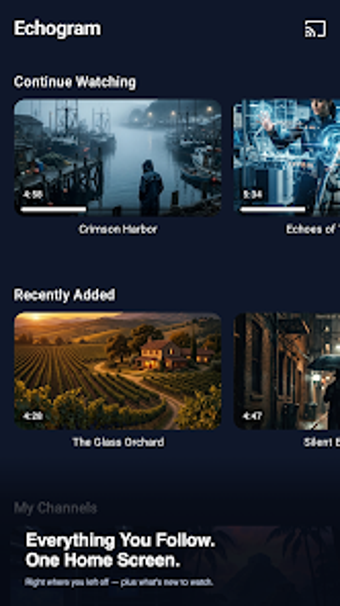
Echogram - Player for Telegram, developed by Illuzion Apps, turns Telegram chats and channels into a browsable media library. The app provides a dedicated player that streams audio and video from Telegram, indexes media by origin, and plays content on phones, tablets, and connected screens. Highlights include playback controls, browsing by conversation or folder, quick access to recent items, and basic cache settings for storage-conscious users. Aimed at Telegram media followers, low-storage device users, and people who want a dedicated player for large-screen playback.

Unlock your creativity with Adobe Stock
Get 10 images or 1 video with a free trial
What is Echogram used for?
Echogram is an independent player that re-presents Telegram media as a dedicated viewing library. The app uses the official Telegram API for authentication and does not host or distribute user data; media streams from Telegram servers and stays on the device's cache. Illuzion built the app for Android devices and it supports Android smartphones, tablets, Android TV, and Fire TV; it requires Android 8.0 or higher for optimal performance.
What video formats does it support?
The player accepts common container formats with explicit support for MKV, including files that contain multiple audio tracks and embedded subtitles. Users can switch audio streams during playback and adjust subtitle appearance, such as size and color. These controls match the expectations set by standalone media players and help when channels distribute multiplexed or multi-lingual files through Telegram.
How good is the playback for high-resolution media?
The app offers hardware-accelerated playback to handle high-definition and 4K content on capable devices, reducing CPU load during decoding. Smart cache management automatically purges old data to preserve storage space. It also provides casting support for viewing on larger screens and optimizes playback paths for devices with dedicated video acceleration, which helps maintain smooth frame rates for higher-bitrate streams.
Is it better for casual viewers or media enthusiasts?
Design choices steer the app toward media consumers and channel curators rather than general messaging use. Echogram organizes content by chat, channel, folder, or topic to surface collections and uses TMDB metadata to add posters and ratings for easier discovery. For users who want granular playback options, the app’s audio-track switching and subtitle controls deliver depth; casual users get a single-purpose player that keeps playback and browsing in one place.
In conclusion, Echogram is a focused choice for Telegram media consumers
It serves users who want a devoted playback and browsing experience tied to their Telegram feeds, and it favors media presentation over messaging functions. For those who treat Telegram as a content source, the app provides a concentrated way to access and view files; for users who need broader chat or collaboration features, a general messaging client remains necessary. That clarity of purpose makes it suitable for media-focused workflows.